Introdução
If your Kindle Fire 8.9'' has cracked front glass or a damaged screen, use this guide to replace the entire display assembly, including the LCD display, touch digitizer, front panel, and frame.
O que você precisa
-
-
Insert a large plastic opening tool next to the Kindle's headphone jack.
-
Move the plastic opening tool evenly around the Kindle, separating the two halves.
 Pergunte ao FixBot
-
-
-
Set the Kindle down on the rear case.
-
Holding the display assembly near the camera, carefully open the display assembly up to about 90 degrees from the rear case.
-
-
-
-
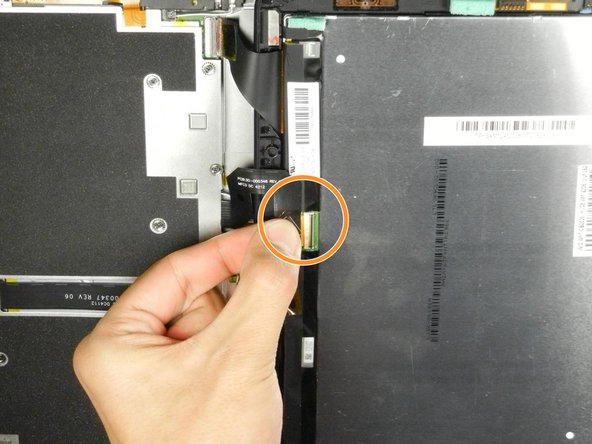
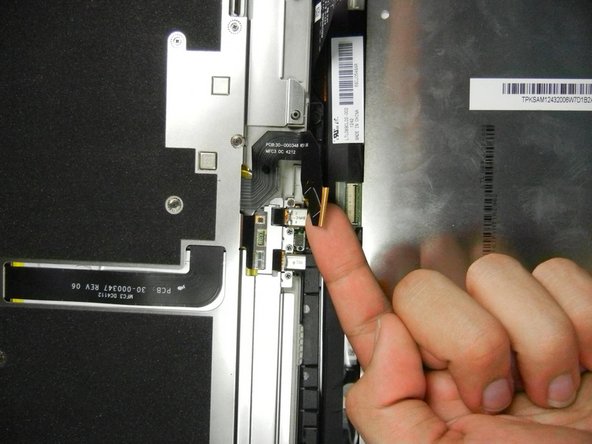
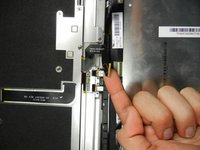
Lift the retaining flap on the ZIF connector of the upper flex cable.
-
Gently pull the cable out of its socket.
-



To reassemble your device, follow these steps in reverse order.
Cancelar: não concluí este guia.
60 outras pessoas executaram este guia.

Equipe

Cal Poly, Team 5-16, Forte Winter 2013 Membro de Cal Poly, Team 5-16, Forte Winter 2013
CPSU-FORTE-W13S5G16
5 Membros
Autoria de 14 guias
21Comentários do guia
Where are the rest of the instructions???? I now have a disassembled Kindle and no idea how to install the new screen!
At the end of every iFixit guide, next to the "I did it! Success!" button, there is a message that says "To reassemble your kindle, follow these steps in reverse order." However in some cases, there will be a slightly different message. In the case of this guide, the message says "To reassemble your kindle, follow these steps in reverse order. Just make sure that you successfully connect the two flex cables to each half of your kindle and that you then align the two halves on the side opposite the camera before reassembling it."
I think Lisa is asking for instructions concerning LCD display unmount. I got the same issue
How do you put the screen on??????
while you are at it, try replacing the battery for a better experience.
I did, checkout this battery for kindle here :
