Ir para o conteúdo principal
Participe da comunidade de reparos - Criar conta

Insignia NS-B4111 Switchboard Replacement

O que você precisa

  1. Insignia NS-B4111 Switchboard Replacement, Battery: passo 1, imagem 1 %32 Insignia NS-B4111 Switchboard Replacement, Battery: passo 1, imagem 2 %32
    • Unplug and remove the power cord. Turn the boombox upside down.

    • Grip the sides of the case and use your thumbs to pop open the battery cover.

    Pergunte ao FixBot

    Comentar

  2. Insignia NS-B4111 Switchboard Replacement: passo 2, imagem 1 %32 Insignia NS-B4111 Switchboard Replacement: passo 2, imagem 2 %32
    • Pry out the batteries with your fingers.

    Pergunte ao FixBot

    Comentar

  3. Insignia NS-B4111 Switchboard Replacement, Casing: passo 3, imagem 1 %32
    • Turn the boombox upside down again. With the Phillips PH1 or the Flathead #3 screwdriver, remove the three 14mm black screws.

    • Remove the four 18mm chrome screws with the Phillips PH1 screwdriver.

    Pergunte ao FixBot

    Comentar

  4. Insignia NS-B4111 Switchboard Replacement: passo 4, imagem 1 %32 Insignia NS-B4111 Switchboard Replacement: passo 4, imagem 2 %32
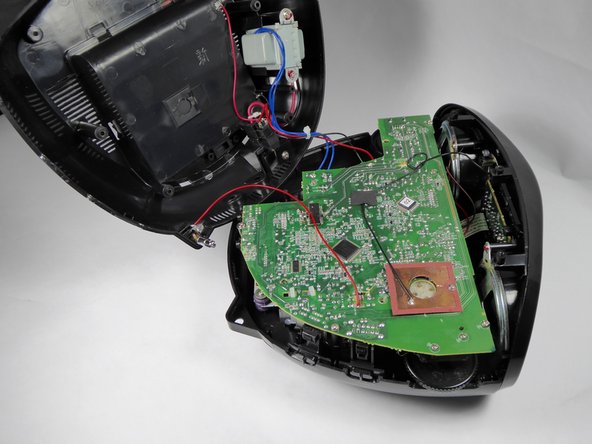
    • Gently remove the bottom half of the casing from the top half of the casing.

    • The antenna base is connected to the motherboard by a red wire. This wire will prevent the two halves from separating completely.

    Pergunte ao FixBot

    Comentar

  5. Insignia NS-B4111 Switchboard Replacement, Antenna Base: passo 5, imagem 1 %32 Insignia NS-B4111 Switchboard Replacement, Antenna Base: passo 5, imagem 2 %32
    • Remove the 10mm chrome screw from the antenna base with the Phillips PH1 screwdriver. Remove the antenna base from the casing.

    • This red wire will now be loose and you can move it out of the antenna base slot.

    Pergunte ao FixBot

    Comentar

  6. Insignia NS-B4111 Switchboard Replacement, Motherboard: passo 6, imagem 1 %32
    • Unscrew the four 12.5mm screws with the Phillips PH1 Screwdriver.

    • Unscrew the one 10mm long screw with the Phillips PH1 Screwdriver.

    Pergunte ao FixBot

    Comentar

  7. Insignia NS-B4111 Switchboard Replacement: passo 7, imagem 1 %32
    • Orient the device so that the back is facing you.

    • Unplug the six pin male/female header from its socket on the motherboard. The wires on the header are these colors: burgundy, red, orange, yellow, green, and blue.

    • Use a tweezer if you find it hard to pull the header out with your fingers.

    • Gently pull out the ribbon cable from its socket on the motherboard.

    • Pay attention to the orientation of the header and the ribbon cable. Replacing the wires the wrong way may short circuit the board.

    Pergunte ao FixBot

    Comentar

  8. Insignia NS-B4111 Switchboard Replacement: passo 8, imagem 1 %32
    • Rotate the device so that the front is facing you.

    • Unplug the four pin header from its socket on the motherboard. The wires on the header are these colors: brown, red, orange, and yellow.

    • Use a tweezer if you find it hard to pull this header out with your fingers.

    • Gently pull out the ribbon cable from its socket.

    • Pay attention to the orientation of the header and the ribbon cable. Replacing the base the wrong way may short circuit the board.

    Pergunte ao FixBot

    Comentar

  9. Insignia NS-B4111 Switchboard Replacement: passo 9, imagem 1 %32
    • Pull out the two pin header from its socket on the motherboard. The wires on this header are black and white.

    • Use a tweezer if you find it hard to pull this cable out with your fingers.

    Pergunte ao FixBot

    Comentar

  10. Insignia NS-B4111 Switchboard Replacement, Front Panel: passo 10, imagem 1 %32
    • Remove the four 8.5mm chrome screws from the front panel with the Phillips PH1 screwdriver.

    Pergunte ao FixBot

    Comentar

  11. Insignia NS-B4111 Switchboard Replacement: passo 11, imagem 1 %32
    • Remove the front panel from the top casing.

    Pergunte ao FixBot

    Comentar

  12. Insignia NS-B4111 Switchboard Replacement, Switchboard: passo 12, imagem 1 %32
    • Remove the 10.5 mm screws in the corners with the Phillips PH1 screwdriver.

    • Remove the two 10.5 mm screws near the center of the board with the Phillips PH1 screwdriver.

    Pergunte ao FixBot

    Comentar

  13. Insignia NS-B4111 Switchboard Replacement: passo 13, imagem 1 %32
    • Lift the board to remove it from the front panel.

    Pergunte ao FixBot

    Comentar

Conclusão

To reassemble your device, follow these instructions in reverse order.

Cancelar: não concluí este guia.

Uma outra pessoa concluiu este guia.

Equipe

UC Davis, Team 1-5, Oliver Fall 2016 Membro de UC Davis, Team 1-5, Oliver Fall 2016

UCD-OLIVER-F16S1G5

5 Membros

Autoria de 11 guias

0Comentários do guia

Comentar

Visualizações:

Últimas 24 horas: 1

Últimos 7 dias: 11

Últimos 30 dias: 59

Ao todo: 896