Ir para o conteúdo principal
Participe da comunidade de reparos - Criar conta

Huawei Ideos S7 Slim Logic Board Replacement

O que você precisa

  1. Huawei Ideos S7 Slim Logic Board Replacement, Battery: passo 1, imagem 1 %32 Huawei Ideos S7 Slim Logic Board Replacement, Battery: passo 1, imagem 2 %32 Huawei Ideos S7 Slim Logic Board Replacement, Battery: passo 1, imagem 3 %32
    • Place the tablet on a flat clear surface to keep the screen safe.

    • Slide the larger portion of the back cover off the tablet.

    • This will reveal the battery.

    Pergunte ao FixBot

    Comentar

  2. Huawei Ideos S7 Slim Logic Board Replacement: passo 2, imagem 1 %32 Huawei Ideos S7 Slim Logic Board Replacement: passo 2, imagem 2 %32
    • Lift the battery out with your finger.

    • Make sure you use the slot near the bottom of the device as shown. Trying to lift from anywhere else will not work and may damage the battery or the device.

    Pergunte ao FixBot

    Comentar

  3. Huawei Ideos S7 Slim Logic Board Replacement, Logic Board: passo 3, imagem 1 %32 Huawei Ideos S7 Slim Logic Board Replacement, Logic Board: passo 3, imagem 2 %32
    • Using a plastic opening tool, pry off the top cover casing gently by moving the tool along all three sides.

    Pergunte ao FixBot

    Comentar

  4. Huawei Ideos S7 Slim Logic Board Replacement: passo 4, imagem 1 %32
    • With a T5 hexagonal head, remove the nine black 2.5 mm torx screws. Place them carefully aside on the magnetic mat.

    Pergunte ao FixBot

    Comentar

  5. Huawei Ideos S7 Slim Logic Board Replacement: passo 5, imagem 1 %32 Huawei Ideos S7 Slim Logic Board Replacement: passo 5, imagem 2 %32 Huawei Ideos S7 Slim Logic Board Replacement: passo 5, imagem 3 %32
    • Using a plastic opening tool, pry off the back casing gently on each side of the tablet.

    Pergunte ao FixBot

    Comentar

  6. Huawei Ideos S7 Slim Logic Board Replacement: passo 6, imagem 1 %32 Huawei Ideos S7 Slim Logic Board Replacement: passo 6, imagem 2 %32 Huawei Ideos S7 Slim Logic Board Replacement: passo 6, imagem 3 %32
    • Using a Phillips #00 screwdriver, remove the following screws:

    • Four 5mm wide grey Phillips screws on the logic board.

    • One of the 5mm screws is hidden under the circular white tape in the center of the logic board.

    • Seven 3mm small grey Phillips screws (four on one side, three on the other) from the black side casing.

    Pergunte ao FixBot

    Comentar

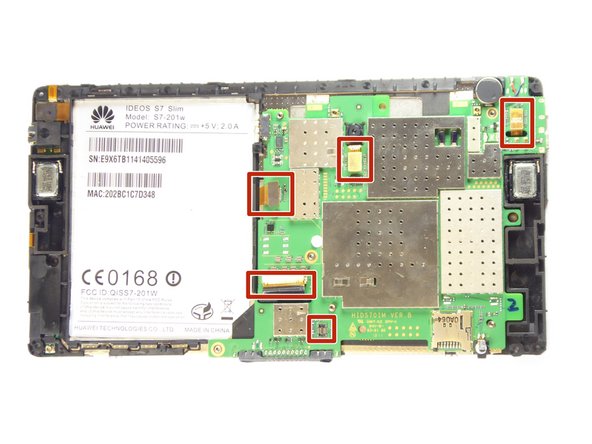
  7. Huawei Ideos S7 Slim Logic Board Replacement: passo 7, imagem 1 %32 Huawei Ideos S7 Slim Logic Board Replacement: passo 7, imagem 2 %32 Huawei Ideos S7 Slim Logic Board Replacement: passo 7, imagem 3 %32
    • Disconnect the five cables connected to the logic board and then carefully lift the logic board out of the casing.

    Pergunte ao FixBot

    Comentar

Conclusão

To reassemble your device, follow these instructions in reverse order.

Cancelar: não concluí este guia.

Uma outra pessoa concluiu este guia.

Equipe

UC Davis, Team 1-1, Oliver Fall 2016 Membro de UC Davis, Team 1-1, Oliver Fall 2016

UCD-OLIVER-F16S1G1

5 Membros

Autoria de 10 guias

0Comentários do guia

Comentar

Visualizações:

Últimas 24 horas: 0

Últimos 7 dias: 4

Últimos 30 dias: 37

Ao todo: 978