Introdução
Is your device not properly loading pages or is experiencing the blue screen of death (BSoD)? If so, the RAM may be faulty and needs to be replaced. Follow the instructions in this guide to remove and replace the RAM in the HP Pavilion 14-cf001dx laptop.
O que você precisa
-
-
Flip the device over so that the backside is facing you.
-
Remove the rubber feet to expose six screws.
-
Using the Phillips #1 screwdriver, remove six screws securing the back panel to the device.
-
-
-
-
Using the Phillips #0 screwdriver, remove the four screws securing the battery in place.
-
-
-
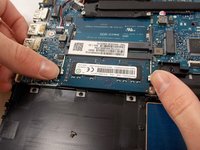
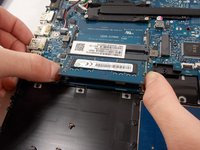
Using your fingers, simultaneously press the two silver clamps away from each other to release the RAM.
-
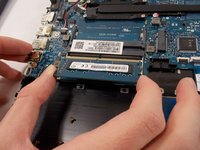
Remove the RAM from the device.
-


To reassemble your device, follow these instructions in reverse order.

Equipe

UMass Dartmouth, Team 2-7, Sinclaire Fall 2021 Membro de UMass Dartmouth, Team 2-7, Sinclaire Fall 2021
UMASSD-SINCLAIRE-F21S2G7
3 Membros
Autoria de 7 guias
