Ir para o conteúdo principal

Game Boy Outer Case Replacement

Pré-requisito somente
Este é um guia somente para pré-requisitos! Este guia faz parte de outro procedimento e não deve ser usado sozinho.

O que você precisa

  1. Game Boy Outer Case Replacement, Batteries: passo 1, imagem 1 %32 Game Boy Outer Case Replacement, Batteries: passo 1, imagem 2 %32
    • Switch your Game Boy off and remove the cartridge.

  2. Game Boy Outer Case Replacement: passo 2, imagem 1 %32 Game Boy Outer Case Replacement: passo 2, imagem 2 %32 Game Boy Outer Case Replacement: passo 2, imagem 3 %32
    • Use a fingernail (or small coin) to push down on the battery door latch and remove the battery door.

    • The release latch is a plastic spring clip. If your Game Boy is getting on in years, be careful as the plastic may be brittle.

    • When you're replacing the cover, be sure to get its two plastic tabs into the slots in the bottom of the battery compartment before pushing the cover back in place.

  3. Game Boy Outer Case Replacement: passo 3, imagem 1 %32 Game Boy Outer Case Replacement: passo 3, imagem 2 %32
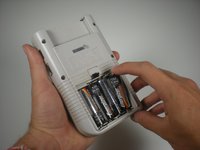
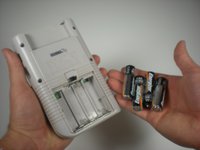
    • Use a fingernail to pry each battery outward from the positive (+) terminal to remove them.

    • Dispose of used batteries properly!

    • Remove the batteries from your Game Boy before storing it for more than a month or so.

  4. Game Boy Outer Case Replacement, Outer Case: passo 4, imagem 1 %32
    • Remove the six Triwing screws from the back of the device.

  5. Game Boy Outer Case Replacement: passo 5, imagem 1 %32
    • Gently separate the device's front casing from the back casing after you remove the screws.

    • Be careful not to completely separate the casing halves, as they are still joined by a large ribbon cable that may be damaged.

  6. Game Boy Outer Case Replacement: passo 6, imagem 1 %32
    • Slide the front side of the casing down to expose the ribbon cable connector.

  7. Game Boy Outer Case Replacement: passo 7, imagem 1 %32
    • Grip the ribbon connector with your thumb and forefinger. Pull down gently until the connector, not the ribbon itself, comes out of its socket.

    • Separate the front and back casings.

Conclusão

To reassemble your device, follow these instructions in reverse order.

13 outras pessoas executaram este guia.

Andrew Tramposch

Membro desde: 06/24/10

2.285 Reputação

Autoria de 6 guias

Equipe

Cal Poly, Team 3-2, Johann Summer 2010 Membro de Cal Poly, Team 3-2, Johann Summer 2010

CPSU-JOHANN-R10S3G2

3 Membros

Autoria de 36 guias

2Comentários do guia

U need a tri-wing screwdriver not a Philips #00

radiofreeroyaloak - Responder

It is a Philips if gb was made after 1998 or so.

Sam - Responder

Comentar

Visualizações:

Últimas 24 horas: 0

Últimos 7 dias: 1

Últimos 30 dias: 15

Ao todo: 15,832