Ir para o conteúdo principal
Participe da comunidade de reparos - Criar conta

Disassembling 8BitDo Ultimate Wireless Case

O que você precisa

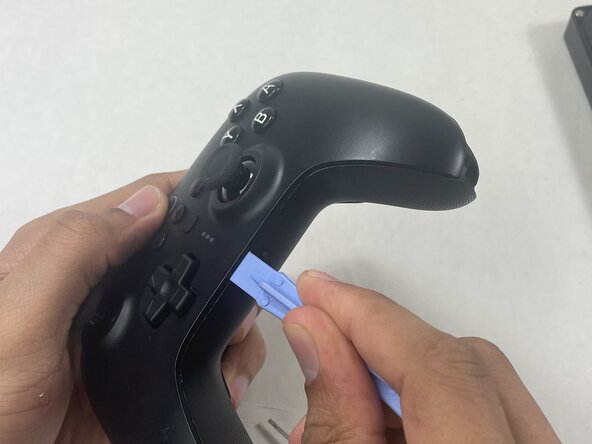
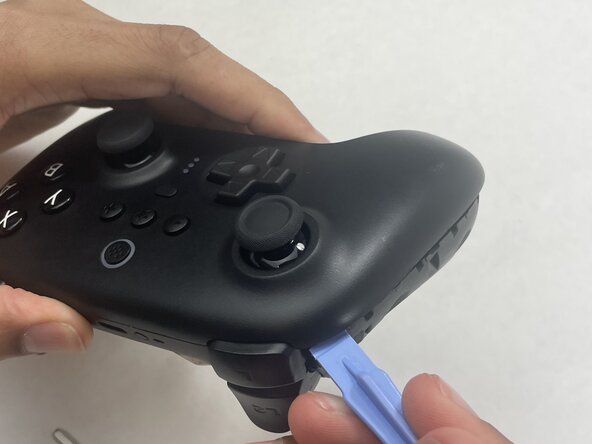
  1. Disassembling 8BitDo Ultimate Wireless Case, Case: passo 1, imagem 1 %32 Disassembling 8BitDo Ultimate Wireless Case, Case: passo 1, imagem 2 %32
    • Insert an opening pick into the seam between the left controller grip and main controller body.

    • Pry the grip off.

    • Repeat for the right grip.

    Pergunte ao FixBot
  2. Disassembling 8BitDo Ultimate Wireless Case: passo 2, imagem 1 %32 Disassembling 8BitDo Ultimate Wireless Case: passo 2, imagem 2 %32
    • Remove the six 8 mm T6 Torx screws securing the rear case to the front case.

    Pergunte ao FixBot
  3. Disassembling 8BitDo Ultimate Wireless Case: passo 3, imagem 1 %32 Disassembling 8BitDo Ultimate Wireless Case: passo 3, imagem 2 %32 Disassembling 8BitDo Ultimate Wireless Case: passo 3, imagem 3 %32
    • Insert an opening tool into seam at the bottom of the device and carefully pry the front and back shells apart.

    • Set the halves next to each other with care not to strain the connected ribbon cables.

    Pergunte ao FixBot
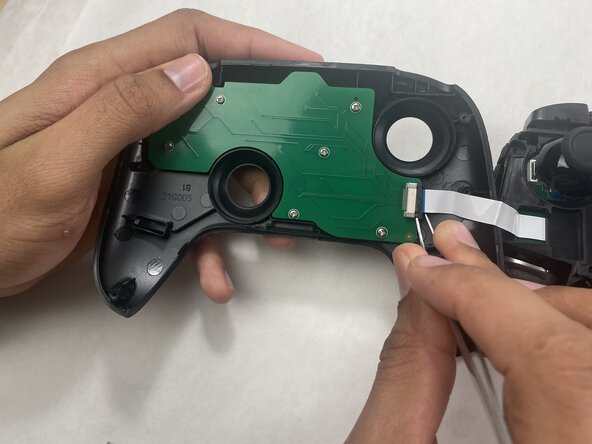
  4. Disassembling 8BitDo Ultimate Wireless Case: passo 4, imagem 1 %32 Disassembling 8BitDo Ultimate Wireless Case: passo 4, imagem 2 %32 Disassembling 8BitDo Ultimate Wireless Case: passo 4, imagem 3 %32
    • The ribbon cable is secured with a locking tab connector.

    • Use tweezers to unlock the locking tab on the ribbon cable connector, then gently disconnect the ribbon cable.

    Pergunte ao FixBot
Conclusão

To reassemble your device, follow these instructions in reverse order.

Connor Bassolino

Membro desde: 03/29/22

23.163 Reputação

Autoria de 111 guias

0Comentários do guia

Comentar

Visualizações:

Últimas 24 horas: 2

Últimos 7 dias: 16

Últimos 30 dias: 47

Ao todo: 47