Ir para o conteúdo principal

DJI Spark Camera Replacement

O que você precisa

  1. DJI Spark Camera Replacement, Propellers: passo 1, imagem 1 %32
    • Push down on the propeller that is being replaced.

  2. DJI Spark Camera Replacement: passo 2, imagem 1 %32 DJI Spark Camera Replacement: passo 2, imagem 2 %32
    • Twist the propeller until it feels loose.

    • Pull on it until it comes off.

  3. DJI Spark Camera Replacement, Battery: passo 3, imagem 1 %32 DJI Spark Camera Replacement, Battery: passo 3, imagem 2 %32 DJI Spark Camera Replacement, Battery: passo 3, imagem 3 %32
    • Flip the drone over.

    • Grip the left and right sides of the battery.

    • Slide firmly forward until it pops out.

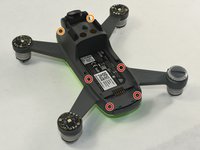
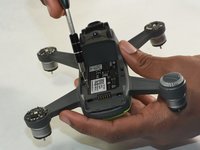
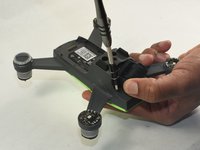
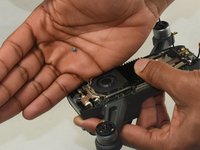
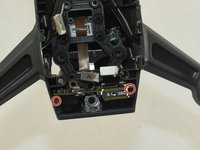
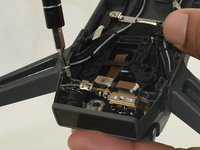
  4. DJI Spark Camera Replacement, Lid: passo 4, imagem 1 %32 DJI Spark Camera Replacement, Lid: passo 4, imagem 2 %32 DJI Spark Camera Replacement, Lid: passo 4, imagem 3 %32
    • Flip the drone over.

    • Remove the four 1.5mm Hex screws.

    • Remove the two 1.5mm Hex screws near the camera head.

    • You may need to remove plastic nubs from the hex screws using a spudger first.

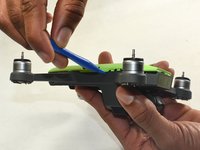
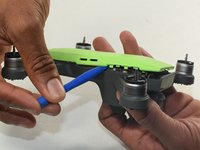
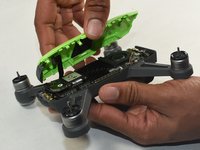
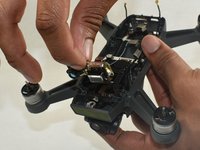
  5. DJI Spark Camera Replacement: passo 5, imagem 1 %32 DJI Spark Camera Replacement: passo 5, imagem 2 %32 DJI Spark Camera Replacement: passo 5, imagem 3 %32
    • Hold the drone so the lid is facing up.

    • Insert the plastic opening tool into the side of the drone.

    • Slide the tool around the perimeter until you can lift the top off.

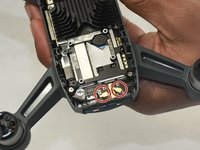
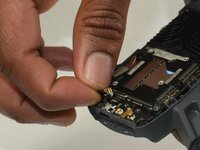
  6. DJI Spark Camera Replacement, Camera: passo 6, imagem 1 %32 DJI Spark Camera Replacement, Camera: passo 6, imagem 2 %32
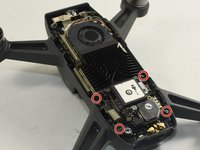
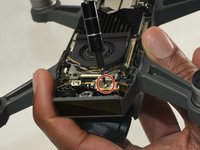
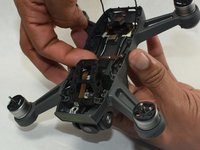
    • Disconnect two gold antenna next to the internal GPS while removing the motherboard.

  7. DJI Spark Camera Replacement: passo 7, imagem 1 %32 DJI Spark Camera Replacement: passo 7, imagem 2 %32 DJI Spark Camera Replacement: passo 7, imagem 3 %32
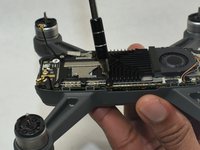
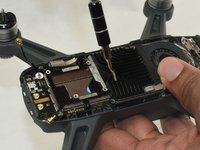
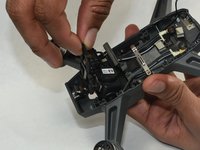
    • Remove all the Phillips #0 screws attaching the motherboard to the drone.

    • It is the piece with both the fan and GPS module on it.

  8. DJI Spark Camera Replacement: passo 8, imagem 1 %32 DJI Spark Camera Replacement: passo 8, imagem 2 %32
    • Remove the 3.0 mm Phillips #000 screw.

  9. DJI Spark Camera Replacement: passo 9, imagem 1 %32 DJI Spark Camera Replacement: passo 9, imagem 2 %32 DJI Spark Camera Replacement: passo 9, imagem 3 %32
    • Remove the two Phillips #0 screws on the right and left sides.

    • Once removed, pull the front facing sensor out.

  10. DJI Spark Camera Replacement: passo 10, imagem 1 %32 DJI Spark Camera Replacement: passo 10, imagem 2 %32 DJI Spark Camera Replacement: passo 10, imagem 3 %32
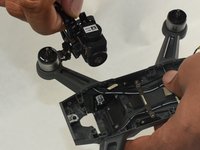
    • Gently remove the gimbal along with the camera from the top of the device.

Conclusão

To reassemble your device, follow these instructions in reverse order.

3 outras pessoas executaram este guia.

Amelia Hagberg

Membro desde: 10/21/19

463 Reputação

Autoria de 3 guias

Equipe

2Comentários do guia

Good start, but missing many steps and details.

Basil Yokarinis - Responder

I am now going to try and fix my drone. thank you so much

sebasnavarro1116 - Responder

Comentar

Visualizações:

Últimas 24 horas: 2

Últimos 7 dias: 16

Últimos 30 dias: 54

Ao todo: 6,921