Introdução
This guide walks you through how to replace a broken LCD screen on your Canon PowerShot SX160 IS by disassembling a portion of the camera to access the non operational piece.
O que você precisa
-
-
Unscrew the 2-4.8mm black screws from the front of the camera using a #0 Phillips head screw driver.
-
Unscrew the 2-4.8mm black screws from the side of the camera using a #0 Phillips head screw driver.
-
Unscrew the 3-4.8mm black screws from the bottom of the camera using a #0 Phillips head screw driver.
-
-


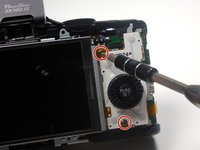
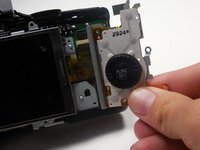


Congratulations, you have successfully replaced your LCD screen. To reassemble your device, follow these instructions in reverse order.
Cancelar: não concluí este guia.
2 outras pessoas executaram este guia.



Equipe

Colorado Springs, Team 2-3, Panko Spring 2015 Membro de Colorado Springs, Team 2-3, Panko Spring 2015
UCCS-PANKO-S15S2G3
3 Membros
Autoria de 6 guias
