Ir para o conteúdo principal

Canon EOS Rebel T4i LCD Screen Replacement

O que você precisa

  1. Canon EOS Rebel T4i LCD Screen Replacement, Battery: passo 1, imagem 1 %32
    • Locate the battery cover at the bottom of the camera.

    • Pull down on the black tab to open the cover.

  2. Canon EOS Rebel T4i LCD Screen Replacement: passo 2, imagem 1 %32
    • Push the grey tab on the right side of the battery.

    • Remove the battery from the slot.

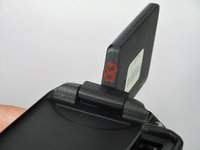
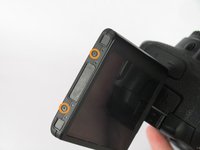
  3. Canon EOS Rebel T4i LCD Screen Replacement, LCD Screen: passo 3, imagem 1 %32 Canon EOS Rebel T4i LCD Screen Replacement, LCD Screen: passo 3, imagem 2 %32 Canon EOS Rebel T4i LCD Screen Replacement, LCD Screen: passo 3, imagem 3 %32
    • Remove the six screws on the housing of the LCD.

    • Four 3.1mm JIS screws on the side with the hinge.

    • Two 2.7mm JIS screws

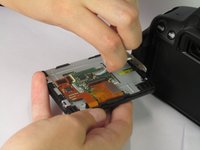
  4. Canon EOS Rebel T4i LCD Screen Replacement: passo 4, imagem 1 %32
    • Remove the plastic back of the LCD.

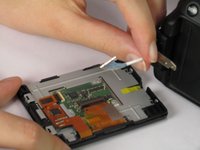
  5. Canon EOS Rebel T4i LCD Screen Replacement: passo 5, imagem 1 %32 Canon EOS Rebel T4i LCD Screen Replacement: passo 5, imagem 2 %32
    • Unplug the blue cable attached to the back of the LCD.

Conclusão

To reassemble your device, follow these instructions in reverse order.

7 outras pessoas executaram este guia.

Jordan Rabold

Membro desde: 04/14/14

807 Reputação

Autoria de 3 guias

Equipe

Cal Poly, Team 12-33, Maness Spring 2014 Membro de Cal Poly, Team 12-33, Maness Spring 2014

CPSU-MANESS-S14S12G33

4 Membros

Autoria de 14 guias

2Comentários do guia

where can I buy a replacement LCD screen for my EOS650D camera in Adelaide. Australia

rdmahony4 - Responder

If it helps any, the part number for the LCD screen is CG2-4025. You can also try just searching something like "Canon EOS 650D LCD screen" on eBay to find a replacement screen.

Zephosk -

Comentar

Visualizações:

Últimas 24 horas: 1

Últimos 7 dias: 12

Últimos 30 dias: 29

Ao todo: 6,226