Ir para o conteúdo principal

Amazon Echo Studio Subwoofer Replacement

O que você precisa

  1. Amazon Echo Studio Subwoofer Replacement, Power Supply Board: passo 1, imagem 1 %32 Amazon Echo Studio Subwoofer Replacement, Power Supply Board: passo 1, imagem 2 %32 Amazon Echo Studio Subwoofer Replacement, Power Supply Board: passo 1, imagem 3 %32
    • Flip the device upside down.

    • Pry up the edge of the rubber base panel with a spudger, then pull the rest of it off by hand.

  2. Amazon Echo Studio Subwoofer Replacement: passo 2, imagem 1 %32 Amazon Echo Studio Subwoofer Replacement: passo 2, imagem 2 %32 Amazon Echo Studio Subwoofer Replacement: passo 2, imagem 3 %32
    • Use a T15 Torx screwdriver to remove the nine 3.2 mm screws.

    • Use a Torx T10 screwdriver to remove the six 2.7 mm screws.

    • After removing the screws, gently lift the base off, with care not to damage any of the connected cables.

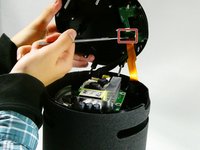
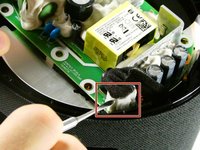
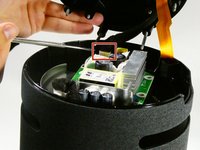
  3. Amazon Echo Studio Subwoofer Replacement: passo 3, imagem 1 %32 Amazon Echo Studio Subwoofer Replacement: passo 3, imagem 2 %32 Amazon Echo Studio Subwoofer Replacement: passo 3, imagem 3 %32
    • Before fully removing the base, remove the three attached connectors.

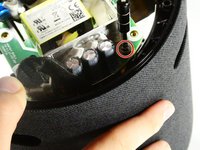
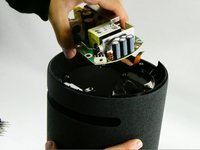
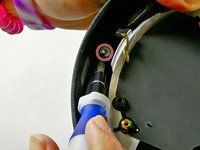
  4. Amazon Echo Studio Subwoofer Replacement: passo 4, imagem 1 %32 Amazon Echo Studio Subwoofer Replacement: passo 4, imagem 2 %32
    • Now unscrew the the single 10 mm Phillips screw.

    • Remove the power supply board.

  5. Amazon Echo Studio Subwoofer Replacement, Subwoofer: passo 5, imagem 1 %32
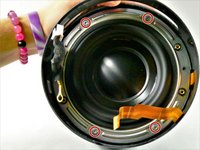
    • Remove the two screws located across from each other on the outside of the plastic ring shown.

    • Remove the plastic outer ring that hugs the inside of the edges of the device.

    • This may require you to use a soft prying tool to separate it from the outer shell.

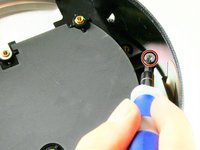
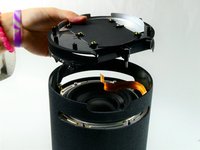
  6. Amazon Echo Studio Subwoofer Replacement: passo 6, imagem 1 %32 Amazon Echo Studio Subwoofer Replacement: passo 6, imagem 2 %32 Amazon Echo Studio Subwoofer Replacement: passo 6, imagem 3 %32
    • Remove the two 2.7 mm screws with a T10 Torx screwdriver.

    • Once the screws are removed, take the power supply's baseplate out of the unit.

    • You may need to gently pry the subwoofer's air ports from the round slots In the side of the unit.

  7. Amazon Echo Studio Subwoofer Replacement: passo 7, imagem 1 %32 Amazon Echo Studio Subwoofer Replacement: passo 7, imagem 2 %32
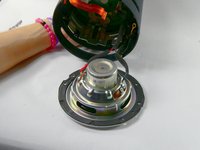
    • On the silver ring located on the outer edge of the plastic portion of the subwoofer, you will see four 2.7 mm screws. Use a Torx T10 screwdriver to remove them, in order to remove of the subwoofer.

    • Once the four screws have been removed, gently pull the subwoofer out as to not damage the wiring connecting the subwoofer to the main board inside the unit.

    • Follow the wires from the subwoofer to the main board and disconnect the connector attaching them.

    • Your subwoofer is now disconnected and ready to be replaced.

Conclusão

To reassemble your device, follow these instructions in reverse order.

Jaiden Wiles

Membro desde: 10/26/22

160 Reputação

Autoria de 1 guia

Equipe

UMass Dartmouth, Team 2-6, Petersen Fall 2022 Membro de UMass Dartmouth, Team 2-6, Petersen Fall 2022

UMASSD-PETERSEN-F22S2G6

4 Membros

Autoria de 7 guias

1Comentário do guia

Does anybody know where to get a replacement subwoofer?

Matthew Johnson - Responder

Comentar

Visualizações:

Últimas 24 horas: 3

Últimos 7 dias: 8

Últimos 30 dias: 37

Ao todo: 1,274