Ir para o conteúdo principal

Acer Aspire A315-58 LCD Screen Replacement

O que você precisa

  1. Acer Aspire A315-58 LCD Screen Replacement, LCD Screen: passo 1, imagem 1 %32
    • Take the screws out and open the lowercase

  2. Acer Aspire A315-58 LCD Screen Replacement, Battery, LCD cable and Wifi cable removal: passo 2, imagem 1 %32 Acer Aspire A315-58 LCD Screen Replacement, Battery, LCD cable and Wifi cable removal: passo 2, imagem 2 %32
    • First, remember to disconnect the battery by sliding the latch towards the battery from the motherboard.

    • Then disconnect the LCD cable (left corner) and the Wifi Cable.

    • Take out four screws at the left and right corners that connect the upper case and LCD part

  3. Acer Aspire A315-58 LCD Screen Replacement, Screen replacement: passo 3, imagem 1 %32 Acer Aspire A315-58 LCD Screen Replacement, Screen replacement: passo 3, imagem 2 %32 Acer Aspire A315-58 LCD Screen Replacement, Screen replacement: passo 3, imagem 3 %32
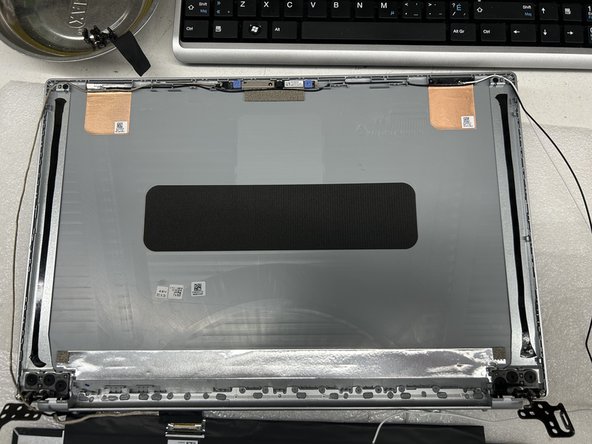
    • Take out the screws and heat up the both edge of the screen where the adhesive tape at.

    • Replace the new tapes shown in the picture on both sides and reassemble the LCD back to the Cover.

Conclusão

To reassemble your device, follow these instructions in reverse order.

2 outras pessoas executaram este guia.

Gongmin Zhou

Membro desde: 06/21/23

129 Reputação

Autoria de 1 guia

0Comentários do guia

Comentar

Visualizações:

Últimas 24 horas: 0

Últimos 7 dias: 12

Últimos 30 dias: 51

Ao todo: 1,197