Okay, after a bit of research, it appears your phone has a dedicated antenna for the bluetooth. I'm theorizing that it either got damaged in the refurb process or as a result of a drop; either one is quite possible. Here's the part.
iPhone 11 Bluetooth Antenna
Finding a guide showing how to replace it is a whole different subject. There doesn't seem to be a guide for just that, but I did locate a guide to replacing the power button/flash/upper microphone assembly that shows the removal of that bluetooth antenna as part of the process.
Manuales / Apple iPhone 11 / Power button, flash and top microphone - Nadie Me Llama Gallina
Note that the guide is written in Spanish, but if you use it with a browser like Chrome that does translation, it works quite well.
Anyway, it looks to me as though you can follow the guide through Step 5, skip Step 6 and remove the antenna as shown in Step 7. Check carefully as I'm not positive about skipping Step 6, but it doesn't look like there's anything to removing the wifi antenna that's needed in order to access the bluetooth antenna.
As you work, take lots of pictures and once you're done you can use them to create your very own iFixit guide to that repair for those who come after you with the same problem. It's easy, fun and will earn the appreciation of the repair community.
Create a new Guide - iFixit
Good luck, and let us know how it all turns out for you!


 1
1 
 75
75  111
111 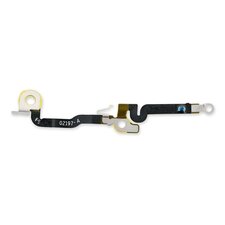


3 comentários
Has anything happened to the phone recently such as damage or liquid exposure? How long has it been like this?
por Jerry Wheeler
There was liquid detected in my lightning port once, but that was because of the increased humidity in winter. Other than that raindrops on the screen but never fully dropped and submerged somewhere. Also got the phone from a refurbishing shop, so they probably made some fixes to the phone (display, lightling and so on). It has been line this pretty much since i required bluetooth for my new airpods or car radio, so i assume all time..
por Zen _
Sometimes a drop from not more than max half a metre. Cracks on the back of my phone show it
por Zen _